Skip to content

Windows 11 25H2: How to Get It, What Changed and What It Quietly Broke

96 recorded views?

Windows 11 25H2 has been out for a year, and plenty of PCs still haven’t got it. Some are sat on 24H2, some are still on Windows 10, and one is under Dave from accounts’ desk running whatever it ran in 2023.

That was fine until the calendar caught up. Windows 11 24H2 Home and Pro stop getting updates on 13 October 2026, the same day the Windows 10 consumer Extended Security Updates year ends. Two deadlines, one Tuesday.

This guide covers how to check your version, the ways to get Windows 11 25H2 (including the Intune route for admins), what changed, what was removed, and where the newly released 26H2 fits in.

Never miss a guide: subscribe here and check out my YouTube channel.

The short version (for anyone reading this between two reboots)

  • Windows 11 25H2 is a small enablement package on top of 24H2. Same code underneath, one restart.
  • Run winver. Build 26200 is 25H2, build 26100 is 24H2.
  • 24H2 Home and Pro lose updates on 13 October 2026. 25H2 Home and Pro are covered until 12 October 2027, Enterprise and Education until 10 October 2028.
  • PowerShell 2.0 and WMIC are gone. Fix old scripts before your users find them for you.
  • Windows 11 26H2 shipped on 29 September 2026 and Microsoft’s download page now hands out 26H2. Admins who want 25H2 specifically should pin it with an Intune feature update policy.

What is Windows 11 25H2?

Windows 11 25H2, also called the Windows 11 2025 Update, reached general availability on 30 September 2025. It is OS build 26200, and it shares a servicing branch with 24H2 (build 26100).

Shared branch means the 25H2 code was already on 24H2 PCs, delivered through monthly updates and left dormant. The enablement package (KB5054156) flips the switch: a small download and a single restart. After years of two-hour feature updates stuck at 61%, it feels like cheating.

Installing it also resets the support clock, which is the part that matters most a year later.

Good to know: a 24H2 PC needs the 29 August 2025 preview update (KB5064081, build 26100.5074) or any later cumulative update before the enablement package will install. If the PC has patched at all in the last year, it already has this.

Windows 11 25H2 support dates and build numbers

Here is where each current Windows 11 version stands, taken from the Windows 11 release information page.

VersionOS buildReleasedHome and Pro updates endEnterprise and Education updates end
24H2261001 October 202413 October 202612 October 2027
25H22620030 September 202512 October 202710 October 2028
26H12800010 February 202614 March 202813 March 2029
26H22630029 September 202610 October 20289 October 2029

That is the standard Windows 11 lifecycle: 24 months for Home and Pro, 36 months for Enterprise and Education. 23H2 Enterprise and Education run out on 10 November 2026, so if any are still lurking in a cupboard, they need moving this month.

26H1 is the odd one out. It only ships on certain new devices that arrived in early 2026, and it isn’t offered as an in-place update from 24H2 or 25H2. If you didn’t buy one, you can ignore it.

Gotcha: Windows doesn’t get monthly feature updates. It gets a cumulative security update on the second Tuesday of each month, plus optional non-security preview updates later in the month. New features usually appear in a preview first, then land in the next security release. The previous version of this article got that wrong, and I’ve had a stern word with it.

What changed in Windows 11 25H2

Because features arrived through monthly updates on 24H2, a lot of what people call new in 25H2 was already on 24H2 PCs. These are the changes worth knowing about, all listed on What’s new in Windows 11, version 25H2.

Features switched on for managed PCs

Temporary enterprise feature control keeps some features off on managed devices until the next feature update. Windows 11 25H2 ends that hold for four of them: Agent in Settings, Improved Windows search, Click to Do and AI actions in File Explorer.

Agent in Settings and Click to Do also have permanent policies, so you can keep them off if your security team twitches at the word “agent”. Improved Windows search still respects your existing search policies.

Admin features worth a look

  • Policy-based removal of preinstalled Microsoft Store apps on Enterprise and Education, so Clipchamp stops reappearing like a bad penny. I cover the settings in my Intune Windows 11 25H2 settings guide.
  • Windows Backup for Organizations is generally available, backing up user settings and Store apps for device refreshes.
  • Quick machine recovery looks for cloud remediations when PCs hit a widespread boot failure.
  • Wi-Fi 7 enterprise access point support (also on 24H2 with KB5065789 or later).
  • Taskbar pinning policies apply without restarting explorer.exe when you use the PinGeneration option.
  • Energy Saver settings can be managed through Group Policy and Intune.

Things your users will notice

File Explorer gets AI actions on the right-click menu: blur background, erase objects and remove background for images, plus a Summarize action for OneDrive and SharePoint files. That summary needs a Microsoft 365 subscription and a Copilot licence, so don’t promise it to the whole office.

Task Manager now measures CPU workload using industry standard metrics, with an optional CPU Utility column if you want the old figure back. Settings > Privacy & security also gains a Text and Image Generation page showing which apps have used Windows’ on-device generative AI.

Good to know: Recall isn’t new in 25H2. It arrived on Copilot+ PCs through 24H2 updates in April 2025, and on managed devices it is disabled and removed by default. If someone says 25H2 “added Recall”, they read the same blog post the old version of this article did.

What Windows 11 25H2 removed: PowerShell 2.0 and WMIC

This is the Windows 11 25H2 section that generates help desk tickets.

PowerShell 2.0 isn’t included in Windows 11 25H2. It was taken out of 24H2 in August 2025 as well, so this is less a 25H2 surprise and more a very long goodbye. Windows PowerShell 5.1 and PowerShell 7 are unaffected.

WMIC is uninstalled when the 25H2 feature update installs. Since August 2026 it is fully removed from 24H2 and later and is no longer available as a Feature on Demand, according to the removed features list. Reinstalling it from optional features is no longer an escape hatch.

Old WMIC commandPowerShell replacement
wmic os get caption,versionGet-CimInstance Win32_OperatingSystem | Select-Object Caption, Version
wmic bios get serialnumberGet-CimInstance Win32_BIOS | Select-Object SerialNumber
wmic computersystem get modelGet-CimInstance Win32_ComputerSystem | Select-Object Manufacturer, Model
wmic logicaldisk get name,freespaceGet-CimInstance Win32_LogicalDisk | Select-Object DeviceID, FreeSpace

To find the scripts that will break, search your script share before Windows 11 25H2 finds them for you. Change the path to suit:

# Find scripts that still call WMIC or PowerShell 2.0
$path = '\\fileserver\scripts'
Get-ChildItem -Path $path -Recurse -Include *.ps1, *.bat, *.cmd, *.vbs -ErrorAction SilentlyContinue |
    Select-String -Pattern 'wmic', '-version 2' -SimpleMatch |
    Select-Object Path, LineNumber, Line |
    Export-Csv -Path .\legacy-script-hits.csv -NoTypeInformation

Gotcha: scripts hide in more places than the script share. Check scheduled tasks, logon scripts, Configuration Manager task sequences, Intune Remediations and that one batch file on the head teacher’s desktop that “just works”.

How to get Windows 11 25H2 in 5 steps

Step 1: Check which version you’re on

  1. Press Win + R, type winver and press Enter.
  2. Read the version and OS build. Version 25H2 with OS build 26200 means you’re already there.
  3. Prefer clicking? Settings > System > About shows the same detail under Windows specifications.

For a quick check over a remote PowerShell session:

Get-ItemProperty 'HKLM:\SOFTWARE\Microsoft\Windows NT\CurrentVersion' |
    Select-Object DisplayVersion, CurrentBuild, UBR

CurrentBuild tells you the version: 26100 is 24H2, 26200 is 25H2 and 26300 is 26H2. UBR is the monthly update level, the bit after the dot.

Step 2: Prepare the PC

  1. Back up anything you care about to OneDrive or an external drive. It’s a small update, but it’s still an update.
  2. Install the latest cumulative update first, so the enablement package prerequisite is in place.
  3. Run the WMIC and PowerShell 2.0 script search above if the PC runs anything home-grown.
  4. Coming from Windows 10? Check the hardware meets the Windows 11 requirements. Enablement packages only work from 24H2, so this will be a full upgrade.

Step 3: Install Windows 11 25H2 through Windows Update

  1. Open Settings > Windows Update.
  2. Select Check for updates.
  3. If Windows 11, version 25H2 is offered, select Download and install.
  4. Restart when asked. One restart, usually quicker than the kettle.
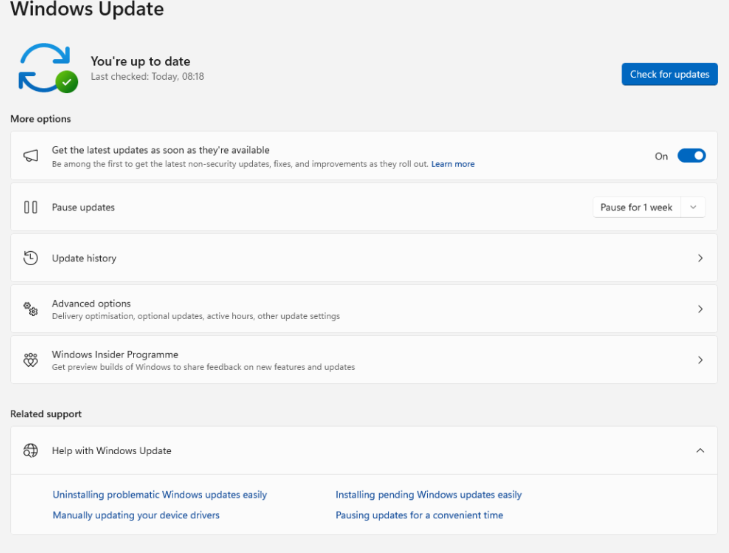
Windows 11 25H2 Windows Update page with the Get the latest updates as soon as they're available toggle switched on
The early-bird toggle in Settings > Windows Update. Flick it with your eyes open.

The “Get the latest updates as soon as they’re available” toggle puts you near the front of the queue for new versions. Since 29 September 2026, eligible 24H2 and 25H2 PCs with it switched on are being offered 26H2, because that is now the newest release.

Tip: if you want 25H2 specifically on a single PC, the KB5054156 enablement package is listed in the Microsoft Update Catalog. Download the package for your PC’s architecture and run it on a fully patched 24H2 machine.

Step 4: Use the Installation Assistant or ISO (Windows 10 PCs)

For Windows 10 PCs, or anything Windows Update refuses to move, the Download Windows 11 page offers the Installation Assistant, installation media and an ISO.

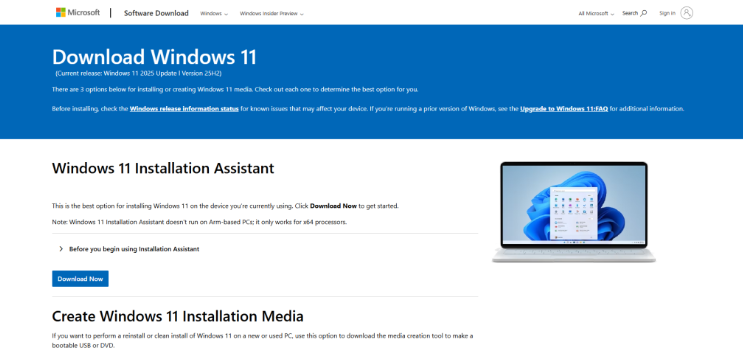
Microsoft Download Windows 11 page with the Installation Assistant for upgrading to Windows 11 25H2 or later
Microsoft’s download page. Check which version it’s handing out before you start.

Read the small print first. The page now offers the Windows 11 2026 Update (version 26H2), not 25H2. For most home users that’s fine: 26H2 sits on the same servicing branch as 25H2 and is supported for a year longer.

To keep files and apps, run the Installation Assistant or setup.exe from the mounted ISO inside Windows. For a clean start from a USB stick, follow my step by step guide to installing Windows 11.

Gotcha: the Windows 10 consumer ESU year ends on 13 October 2026. After that, a home Windows 10 PC gets no more security updates. If the hardware passes the Windows 11 checks, upgrade now. If it doesn’t, put the money towards a new PC rather than a registry hack.

Businesses on commercial Extended Security Updates can buy a second year that runs to 12 October 2027. That buys time to plan, not a reason to stop planning.

Step 5: Deploy Windows 11 25H2 with an Intune feature update policy

In a managed estate, don’t leave the Windows version to chance or to a toggle. An Intune feature update policy moves devices up to a chosen version and then holds them there.

  1. In the Microsoft Intune admin centre, go to Devices > Windows > Windows updates > Feature updates.
  2. Select Create profile and give it a name future you will understand.
  3. In Feature update to deploy, choose Windows 11, version 25H2.
  4. Choose Make available to users as a required update. The optional update choice needs a Windows Autopatch licence.
  5. Under Rollout options, make the update available as soon as possible, on a specific date, or gradually across offer groups.
  6. Assign the policy to a device group, review the settings and select Create.
Windows 11 25H2 feature update policy in the Microsoft Intune admin center next to a 26H2 test policy
My lab: one policy pinning devices to 25H2, one letting a test group try 26H2.

Set Feature update deferral period (days) to 0 in your update rings and make sure feature updates aren’t paused, or the ring quietly overrules the policy. Devices already on a newer version aren’t rolled back; they just aren’t offered anything.

RequirementDetail
LicensingMicrosoft Intune Plan 1, plus a Windows licence that includes the Windows Autopatch entitlement
EditionsPro, Pro Education, Enterprise, Education (not LTSC)
Join typeMicrosoft Entra joined or Microsoft Entra hybrid joined, managed by Intune
Device settingsTelemetry at Required or higher; Microsoft Account Sign-In Assistant service (wlidsvc) running
RolePolicy and Profile Manager, or a custom role with the device configuration permissions

My Intune update rings and feature updates guide covers the full set-up. Not on Intune? The Group Policy “Select target Feature Update version”, with Product Version set to Windows 11 and Target Version set to 25H2, does the same job on Pro and above.

Prove Windows 11 25H2 installed properly

Trust, but verify. Mostly verify, because a Windows 11 25H2 rollout report that says “in progress” for three weeks is not a success.

  • Run winver on a handful of devices and look for Version 25H2, OS build 26200.
  • In Intune, open Reports > Windows Updates > Reports tab > Feature Updates report, select your policy and generate it.
  • Devices showing OfferReady or a later state are enrolled and protected from moving past your chosen version.
  • Run Get-Command wmic on a 25H2 device. If it returns an error, WMIC has gone, as expected.

For a fleet-wide view, this works as a detection script in Intune Remediations. It exits 1 on anything older than 25H2:

$os = Get-ItemProperty 'HKLM:\SOFTWARE\Microsoft\Windows NT\CurrentVersion'
if ([int]$os.CurrentBuild -ge 26200) {
    Write-Output "OK: $($os.DisplayVersion) build $($os.CurrentBuild).$($os.UBR)"
    exit 0
}
Write-Output "Behind: $($os.DisplayVersion) build $($os.CurrentBuild).$($os.UBR)"
exit 1

Windows 11 25H2 gotchas

Safeguard holds. If a PC isn’t offered the update, Microsoft may be holding it back for a known driver or app problem. Check Windows release health before forcing it through with an ISO.

Shared code, shared bugs. Because 24H2, 25H2 and 26H2 share a codebase, they share known issues too. At the time of writing, release health lists a confirmed issue where some apps relying on Windows’ AC-3 (Dolby Digital) decoding close unexpectedly after the 22 September 2026 update.

26H1 devices. A new Arm laptop that shipped with 26H1 can’t move to 25H2 or 26H2, because it runs on a different Windows core. Microsoft says it will get an update path in a future release.

The 24H2 deadline. Home and Pro updates end on 13 October 2026. Do it before then, and preferably not at 4:55pm on a Friday.

WSUS timing. WSUS and Configuration Manager customers didn’t see Windows 11 25H2 until 14 October 2025, a fortnight after general availability. Build that delay into your plans for future versions.

What about Windows 11 26H2?

Windows 11 26H2 reached general availability on 29 September 2026 as build 26300. Like 25H2, it arrives as an enablement package on PCs running 24H2 or 25H2, with one restart in most cases.

Highlights on the 26H2 what’s new page include Administrator protection (just-in-time admin rights, off by default), built-in Sysmon (also off by default), point-in-time restore and a redesigned Start menu. The taskbar can live on any edge of the screen again, which the Windows 98 crowd has been asking for since 2021.

For production fleets, Windows 11 25H2 is still a sensible target: a release with a year of fixes behind it is a reasonable choice. Pinning to 25H2 and piloting 26H2 on a test group, as in the screenshot above, gives you both.

Should you upgrade to Windows 11 25H2?

On 24H2 Home or Pro: yes, and soon. Either 25H2 or 26H2 keeps you patched; 24H2 doesn’t after 13 October 2026.

On Windows 10: move to Windows 11 if the hardware qualifies. The download page gives you 26H2, which is perfectly fine for a home PC.

Running a fleet: pin Windows 11 25H2 with a feature update policy, clear out WMIC and PowerShell 2.0 dependencies, and pilot 26H2 alongside. It’s boring and predictable, which is exactly what you want from Windows updates.

Windows 11 25H2 FAQs

Is Windows 11 25H2 a full upgrade?

Not from 24H2. It installs as a small enablement package (KB5054156) that turns on features already present, with a single restart. From Windows 10 it is a full upgrade.

How do I know if I have Windows 11 25H2?

Run winver. Version 25H2 with OS build 26200 means you have it; build 26100 is 24H2 and 26300 is 26H2.

How long is Windows 11 25H2 supported?

Home and Pro editions get updates until 12 October 2027. Enterprise and Education editions get updates until 10 October 2028.

Can I still install WMIC on Windows 11 25H2?

No. Since August 2026, WMIC is removed from Windows 11 24H2 and later and is no longer available as a Feature on Demand. Use PowerShell CIM cmdlets such as Get-CimInstance instead.

Why does the download page give me 26H2 instead of 25H2?

Microsoft’s download tools provide the newest release, which has been 26H2 since 29 September 2026. To target 25H2, use Windows Update, the KB5054156 enablement package or an Intune feature update policy.

Did Windows 11 25H2 add Recall?

No. Recall is a Copilot+ PC feature that arrived through 24H2 updates in April 2025. On managed devices it is disabled and removed by default.

Further reading

Found this useful? Buy me a coffee, and if you handle subject access requests, have a look at Redact Ninja for redacting PDFs without sending files to a server.

Tags:

2 responses to “Windows 11 25H2: How to Get It, What Changed and What It Quietly Broke”

  1. […] Check out this article Windows 11 25H2 How to Download It and What’s New in the 2025 Update […]

  2. […] Windows 11 25H2: how to get it and what changed […]

Leave a Reply

Your email address will not be published. Required fields are marked *